On-page SEO guide: what Google reads on each page, part by part
On-page SEO is everything you control on the page itself: the title, the address, the headings, the words, the images and the links. This guide checks each part against Google's own documentation, so you know which advice is real and which is folklore.
Updated
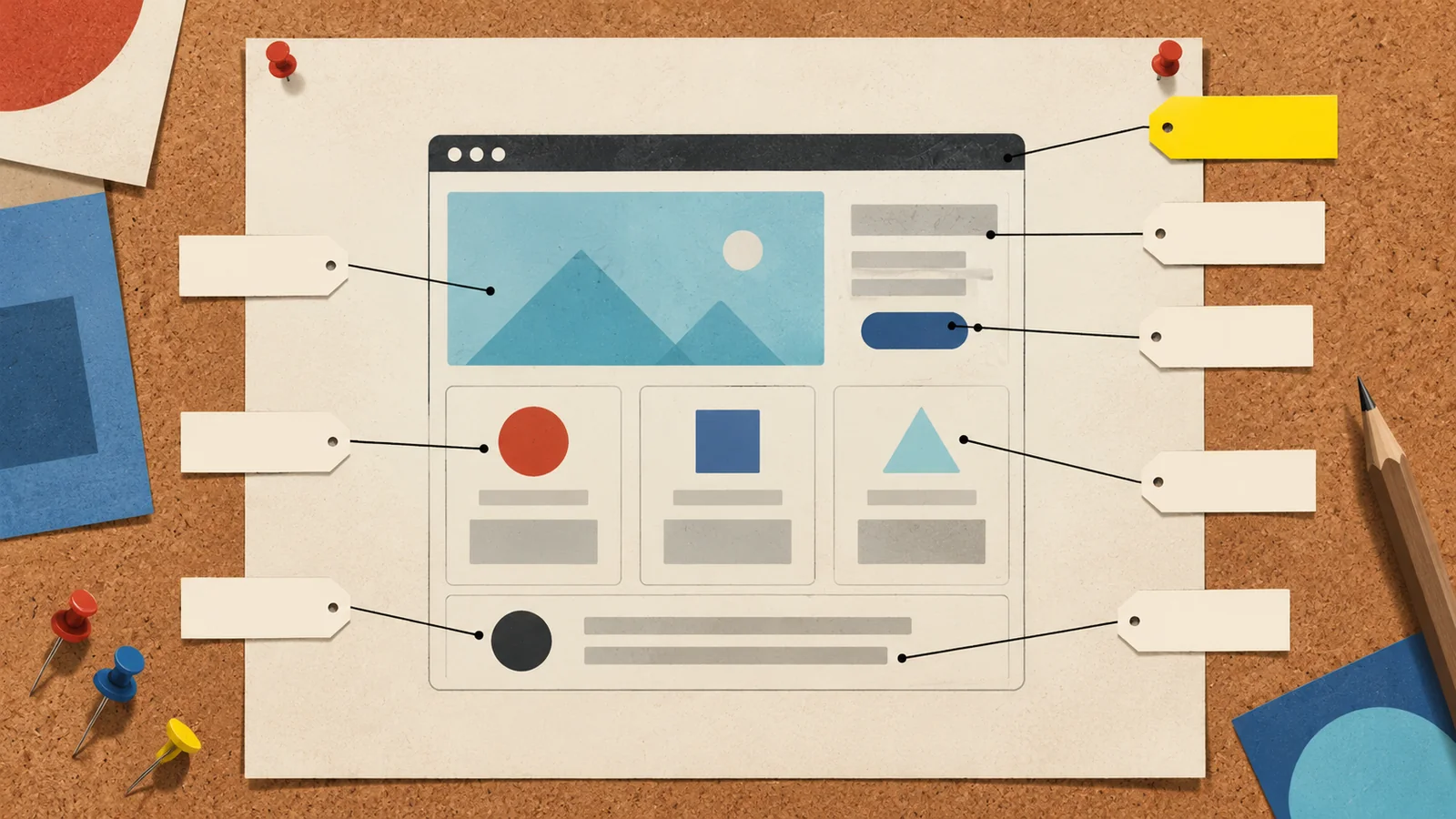
Plate I.A service page, dissected
- Title elementShown in the browser tab; Google's first source for the title link
- URLWords in the address can show as breadcrumbs
- Main headingSays what the page is, and agrees with the title
- Opening answerThe reader's question, answered first
Hot water repairs in Geelong
What a repair usually involves
Repair or replace?
- SubheadingsHelp readers and screen readers find their place
- Alt textDescribes the photo for people who can't see it
- Internal linkPoints to a related page with clear words
- Structured dataInvisible labels that can make a page eligible for rich results
Your search result is assembled by Google, not copied from you
Google builds the blue title and the two lines under it from your page, so you don't fully control either, and they're the only parts most searchers ever see.
Google's documentation on title links lists the sources it uses: the text in your title element first, then the main visual title on the page, heading elements such as the h1, the og:title tag, other large and prominent text, anchor text on the page and the text of links pointing to it. If your title element says one thing and the big heading on the page says another, Google has to pick, and it may not pick yours.
The snippet underneath works the same way. Google says snippets are created mainly from the page content, to preview the part that best fits each search, and that it may use your meta description when that describes the page better. So one page can show different snippets for different searches, and a good meta description helps without guaranteeing anything.
Unique to the page, descriptive and concise. Google says there's no length limit, but it truncates title links to fit the device width, so put the important words first. Avoid repeating the same phrase, which Google says can look spammy.
Google's starter guide describes a good one as short, unique to one particular page, and covering the page's most relevant points. Identical descriptions across a site don't help anyone.
Add it once, concisely, at the start or end of the title. Google's title link docs suggest separating it with a hyphen, colon or pipe.
Google Search Central, "Influencing your title links in search results" (updated 10 December 2025), "Control your snippets in search results" (updated 20 April 2026) and "SEO Starter Guide" (updated 10 December 2025), read 4 October 2026.
Write the title and the main heading as a matching pair
Make the title element and the main heading say the same thing in slightly different words; it's the simplest on-page fix we know. The before-and-after pairs below are illustrations written for this guide, not real sites.
Home page of a trade business
Title: Home
H1: Welcome to our website
Title: Electrician in Bendigo, Domestic and Commercial | Fairline Electrical
H1: Electricians for Bendigo homes and businesses
Neither original line tells a searcher, or Google, what the business does or where.
Service page that targets everything
Title: Plumber, Plumbing, Plumbers Geelong, Best Plumber Geelong
H1: Our Services
Title: Hot Water Repairs and Replacement in Geelong | Brightside
H1: Hot water repairs in Geelong
The first title is the repeated-keyword pattern Google's title docs warn against.
Blog article
Title: Blog post 14
H1: Some thoughts on tax time
Title: What Sole Traders Can Claim at Tax Time | Northgate Accounting
H1: What sole traders can claim at tax time
The new pair names the reader and the question.
Business names above are invented for the examples.

Each on-page element, with what Google actually says
Here's every part of the plate in the hero, with Google's position and what we'd do about it.
URL
Google saysParts of the URL can be shown as breadcrumbs, so descriptive words help people judge a result. The starter guide also says keywords in the URL path alone have hardly any ranking effect.
We'd doShort readable paths like /hot-water-repairs/. Don't change existing URLs just to add keywords; redirects carry their own risk.
Headings
Google saysHeadings in semantic order are great for screen readers, but from Google's view it doesn't matter if they're used out of order, and there's no magic number of headings.
We'd doOne clear main heading and logical subheadings anyway, because people using screen readers depend on them.
Body copy
Google saysWrite content that's easy to read, well organised, unique and up to date. Think about the different words people might search, and don't simply rehash what others have written.
We'd doAnswer the main question in the first two or three sentences, then add what only you know: your prices, your process, your area.
Images and alt text
Google saysAlt text is the most important attribute for image metadata and helps accessibility. It warns against filling alt attributes with keywords.
We'd doDescribe what's in the photo in a short sentence: "Technician replacing a gas hot water unit in a laundry", not "hot water Geelong plumber".
Internal links
Google saysLinks help people and Google find other pages, most new pages are found through links, and anchor text tells both what the linked page is about.
We'd doLink from each service page to related services and guides with plain descriptive words. Never "click here".
Structured data
Google saysIt can make pages eligible for rich results. Its AI features guide says structured data isn't required for AI features and no special markup is needed.
We'd doAdd the types that match your page and are still supported, such as LocalBusiness, Product or Breadcrumb (breadcrumbs now show on desktop only). Our schema guide lists them.
Meta keywords tag
Google saysGoogle Search doesn't use it.
We'd doIgnore it. If a plugin still asks for it, leave it blank.
Word count
Google saysContent length alone doesn't matter for ranking; there's no magical word count.
We'd doWrite until the question is answered properly, then stop. A short page that answers fully beats a padded one.
Google Search Central, "SEO Starter Guide" (updated 10 December 2025), "Image SEO best practices" (updated 2 March 2026), "Link best practices for Google" (updated 10 December 2025) and Google's guide to its generative AI features in Search (updated 10 July 2026), read 4 October 2026.
Your SEO plugin shows green, so why isn't the page ranking?
The coloured lights in Yoast, Rank Math and similar plugins come from a checklist the plugin runs inside your dashboard. Google never sees them. Three versions keep turning up in WordPress support forums, each with a different fix.
Every light is green and the page sits on page four
What's going onThe plugin checks whether your chosen phrase appears in the title, the opening paragraph, the address and a few other places. It can't see who else ranks for that search, whether their pages answer it better, or whether searchers even want a page like yours.
What to doSearch the phrase yourself and open the top three results. Write down what they cover that you don't, such as prices, the steps of the job, photos of real work or a comparison, and add the parts that are true for your business. Judge the page against those results, not against the light.
The plugin says the page is nearly empty, but it's full of text
What's going onSome plugin analysis reads the WordPress editor rather than the finished page, so text added through a page builder such as Elementor can be missed.
What to doCheck the page Google gets instead. In Search Console, run URL Inspection on the address, test the live URL and view the tested page's HTML. If your headings and paragraphs are there, ignore the plugin's word count and keyphrase warnings for that page.
One services page lists eight jobs, a paragraph each
What's going onSomeone searching for one job lands on a page that is mostly about seven others, and no single service has enough detail to be the best answer for it.
What to doGive each service you want enquiries for its own page, with what a customer asks before booking: what's included, the usual steps, what changes the price and where you work. Keep the overview as a short hub that links to them. Start with the services that bring in the most work.
Helpful content is on-page SEO too
What the page says is the biggest on-page decision, and Google publishes the questions it suggests you ask about it. Tidy titles and headings can't make a thin page useful.
Google's guide to creating helpful, reliable, people-first content was updated on 1 October 2026. Its content questions include whether the page offers original information, reporting, research or analysis, whether it describes the topic substantially and completely, and whether it gives insight beyond the obvious. It also suggests a "Who, How, and Why" check: who created the content, how it was made, and why it exists.
Is it clear who wrote the page and why they're worth listening to? For a business site, that can be as simple as the licensed tradesperson or the practice that stands behind the advice.
Can a reader see how you know what you claim? Prices from your own price list, photos of your own jobs and steps from your own process all answer this.
Does the page exist to help a customer, or only to catch a search? Google's guide asks this directly, and pages made mainly to rank are what its spam policies target.
Google's starter guide answers the question of whether E-E-A-T is a ranking factor with a flat "No, it's not." Showing experience and trustworthiness is still a good writing standard; you just can't tick it off with an author box.

What changes on the page for AI search, and what doesn't
Very little changes. Google's guide to its generative AI features says they're rooted in its core ranking systems and that SEO best practices still apply. It lists what you don't need to do.
- No special file or markupGoogle says you don't need llms.txt or new machine-readable files for its AI features, because Google Search ignores them.
- No chunkingThere's no requirement to break content into tiny pieces; Google's systems understand pages with several topics.
- No rewriting for AIIts AI systems understand synonyms and general meaning, so you don't need to write in a special way.
- Structured data is optional hereNot required for AI features; still useful for rich results.
What does matter is the same as ever: clear headings, an easy read and something people can't get from a summary of other pages. That also matters more for clicks than it used to. Pew Research found in July 2025 that users clicked a traditional result in 8% of visits to pages with an AI summary, against 15% without one. Our guide to SEO for AI search has the rest.
Google Search Central's guide to its generative AI features in Search (updated 10 July 2026); Pew Research, July 2025.
Check one of your own pages in ten minutes
Pick your most important page, usually the main service page, and work through these in order. You need only a browser and, for the last two, Google's free tools.
Read the browser tab
That's your title element. Does it say what the page is and where, without repeating itself?
Read the address bar
Is the URL short and readable, or a string of numbers and parameters?
Read the biggest heading
Does it match the title's meaning? Is there only one main heading?
Read the first three sentences
Would a customer know they're in the right place and get a first answer?
Skim the subheadings
Do they tell the page's story on their own, the way a contents page would?
Check the images
Right-click an image and inspect it, or use your site builder's image settings. Is there plain alt text describing it?
Count the useful links
Does the page link to the related services or guides a reader would want next?
Search for your page
Search the business name plus the service. Compare Google's title and snippet with what you wrote.
Test the structured data
Google's free Rich Results Test shows which structured data it can read on the page and any errors.
Inspect the URL
In Search Console, URL Inspection shows whether the page is indexed and how Google last crawled it.
If more than three of those fail, start with the title, the main heading and the first paragraph. Our SEO checklist covers the site-wide jobs, and the SEO content service is there if you'd rather we rewrote the pages.
On-page SEO questions, answered
What is on-page SEO in simple words?
On-page SEO is improving the parts of a web page you control, such as the title, headings, words, images and links, so people and Google can tell what the page is about and find it useful. It's different from off-page work like earning links, and from technical work like site speed and crawling.
What is the difference between on-page and off-page SEO?
On-page SEO is the work on your own pages. Off-page SEO is the signals that come from elsewhere: links from other sites, your Business Profile, reviews and mentions. Our link building guide covers the off-page side.
What is the difference between on-page and technical SEO?
Technical SEO is about whether Google can crawl, render and index your pages: robots rules, sitemaps, redirects, speed and mobile display. On-page SEO is about what each page says and how it's labelled. A page needs both, and they overlap on things like structured data. Our technical SEO guide covers the first.
How long should a title tag be?
Google says there's no length limit on the title element, but it truncates title links in results to fit the device width. Keep titles concise and put the words that matter most at the start. Avoid repeating keywords to fill space.
Do meta descriptions affect SEO?
Their main job is the snippet, not ranking. Google creates snippets mostly from page content and may use your meta description when it describes the page better. A short, unique description that covers the page's main points gives Google a good option and gives searchers a reason to click.
Does alt text help SEO?
Yes. Google's image documentation calls alt text the most important attribute for giving it image information, and it helps people who use screen readers. Describe what the image shows in plain words. Google warns that stuffing alt text with keywords can make a site look spammy.
Are FAQ sections still worth adding to pages?
Only if they answer real questions your customers ask. Google stopped showing FAQ rich results in Search from 7 May 2026, according to its documentation updates log, so FAQ markup no longer produces the expandable result. A good FAQ still helps the reader.
Questions drawn from Google autocomplete suggestions for "what is on page seo", "on page vs", "how long should a title tag", "do meta descriptions" and "does alt text", checked from Australia on 4 October 2026.
Want a second pair of eyes on your pages?
Our free audit reviews titles, headings and content on your key pages and tells you what to fix first.